Agent Control
Agent Control presents Claude Code and Codex sessions running on CLI devices. The App sends control requests; the CLI accesses the workspace, runs the agent, and evaluates approval policy.
Session control does not move workspace or command execution into the App or cloud; cross-device requests travel over an encrypted channel after trust is established. See Devices and security and Data and execution boundaries for keys, connections, and data handling.
Launch an agent
Before launching
- Confirm that the target CLI is online.
- Confirm that the workspace is authorized.
- Confirm that the provider/model route is effective.
- Select an acceptable approval mode.
If a prerequisite is missing
Resolve it in Connect the CLI or Provider Control first.
- Open Agent Control and choose Launch Agent.
- Select the target CLI device.
- Select Claude Code or Codex.
- Choose an authorized workspace directory.
- Select approval behavior and confirm the effective model route.
- After launch, send the first concrete objective in the empty session.
The launch dialog does not duplicate model configuration. If the route is wrong, return to Provider Control for the target device.
For terminal launch options, native configuration, or automation controls, see CLI control and approval modes.
Follow a session
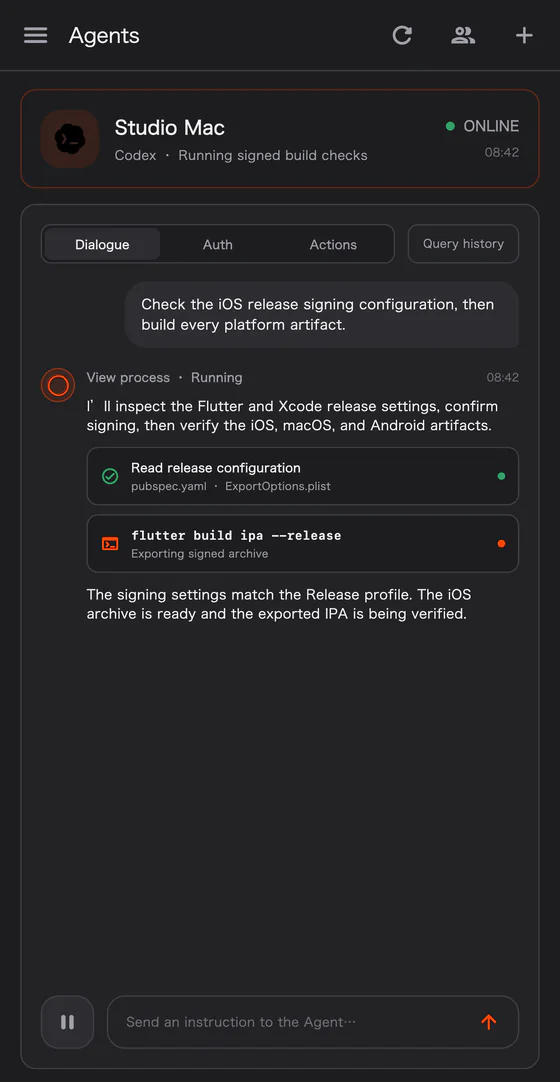
Session details can present user messages, agent responses, tool activity, runtime state, and pending interactions. Within supported capabilities, you can send input, interrupt, stop, or respond to a request.
The activity list is a display-safe status view, not a claim that the App contains every raw target log or the complete workspace content.
Remote workspaces
A remote launch can only select a workspace authorized by the target CLI. If it is not authorized, run this from the target device's management context:
originrouter remote workspace authorize /path/to/project
Protected directories may still require operating-system confirmation. An agent process cannot expand its own workspace authorization.