OriginRouter AppApprovals
Approvals
The App presents and responds to approval requests. Final policy evaluation and command execution always occur on the CLI device running the agent.
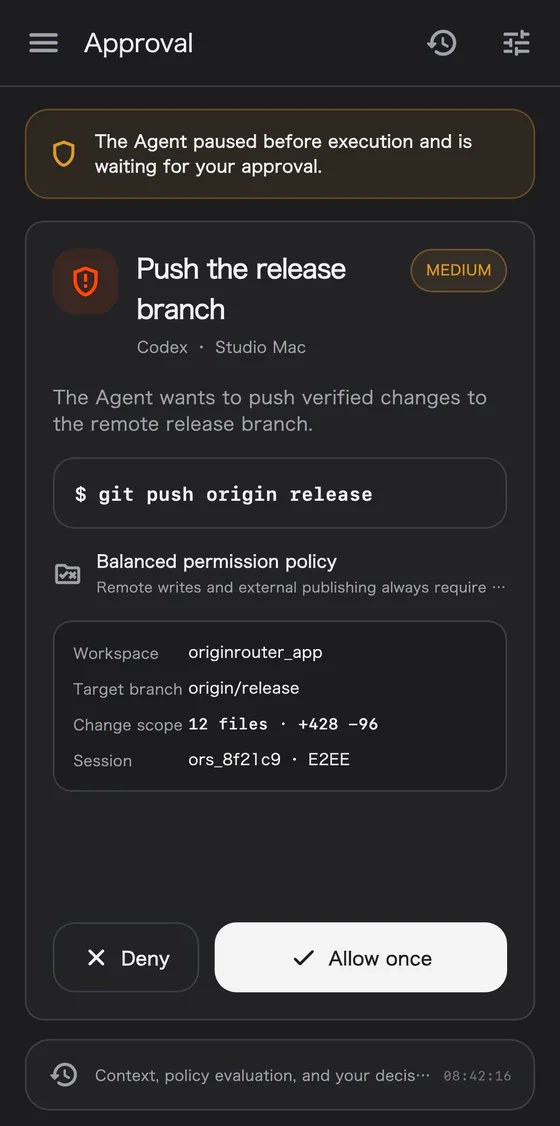
Handle an approval
- Open the agent session or approval surface.
- Read the operation type, target, command, or path evidence.
- Confirm that the request comes from the expected device, workspace, and agent.
- Choose deny, allow once, or another explicit option currently offered by the interface.
- Wait for the target CLI to return the final result.
Server acceptance does not mean the device has executed the operation. Only the CLI's final acknowledgement can mark it complete.
Templates and actual decisions
- AI approval templates describe review scope and preferences.
- Custom approval policies combine structured allow, ask, and deny rules.
- Templates can be managed in the App, but the CLI evaluates each request against the current version and context.
- Insufficient evidence, unknown tools, or unsafe parsing should fall back to human review.
See CLI control and approval modes for modes and command options.
After a denial
A denial blocks the current request. It does not necessarily end the session. The agent can revise its approach, request other input, or wait for a new objective.